Silent Service Command Center
Your whole trading day, in one NinjaTrader workspace.
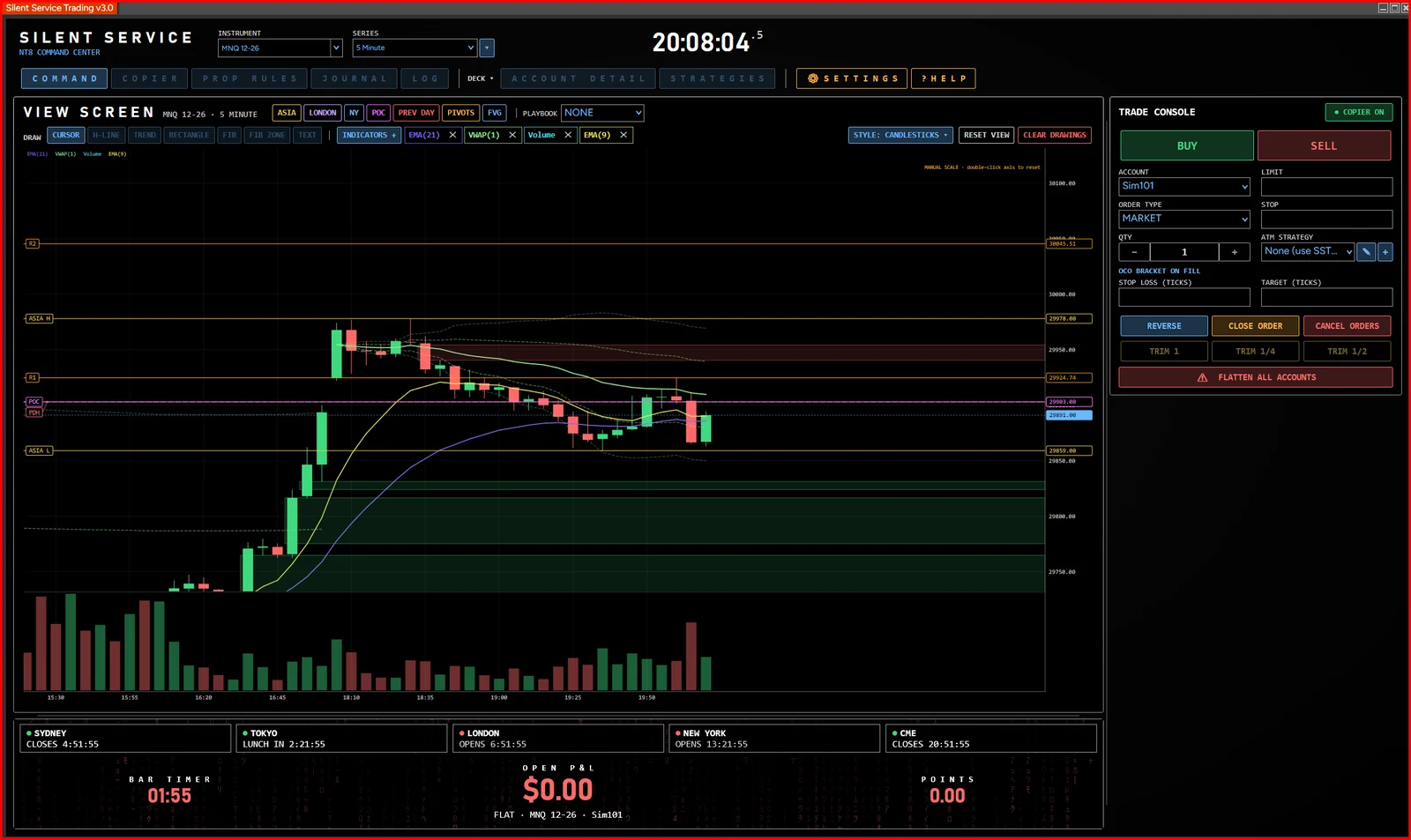
Command Center runs inside NinjaTrader 8 on your own PC. It doesn't trade for you — it gives you one place to trade, monitor, plan and review every account.
Trade
Order entry, position management and ATM integration — plus a trade copier for running several accounts at once.
Trade Console Available
Buy and sell at market or limit with stop-loss and take-profit in ticks. Reverse, close and cancel from the same panel. Buttons never move — status messages appear below them, so a click always lands where you aim.
One-click trims Available
Trim ¼ or ½ of a position in one click, rounded to the nearest contract and always leaving at least one open.
ATM integration Available
Pick any of your NinjaTrader ATM strategy templates from the console. Brackets and ATM orders stay on the instrument they were placed on, even after you switch to another.
Trade copier Available
Trade one lead account and copy to followers, each with its own multiplier, maximum contracts and daily loss / profit lock. Copy minis as micros (NQ → MNQ, ES → MES and more).
Flatten all accounts Available
One click turns the copier off, cancels every working order and closes every position on every account — and logs what each account held.
Step-down rotation In testing
One follower takes each trade until it reaches its target or loss limit, then the next account takes over, with working exit orders on the follower.
Monitor
An overview of every account, its positions and its limits, with connection and status always in view.
Accounts overview Available
Day P&L and balance for every account, sortable by name, P&L or balance. Simulation accounts are kept out of your totals.
Prop-firm rules Available
Per account: stage, drawdown, daily loss and profit limits, and consistency %. Reach a limit and the account locks and flattens; locks lift at the next trading day.
Positions and open P&L Available
Your position and its open P&L — in dollars, points or both — on the chart's position line and in the console header.
Connection and copier status Available
A connection indicator and a COPIER ON / OFF button sit in view at all times, so you know what is live.
Automated strategy overview Available
See which NinjaTrader strategies are running, on which account and instrument, and whether they are in sync.
Max micros per account In testing
Set the most micros each account may trade. The copier caps to it, and your own strategies can read it and size down.
Plan
Market Read, chart levels and playbooks to prepare the session and stay on plan during it.
Market Read Available
The session at a glance: key levels with their distance from price, market bias and the opening range.
Chart levels Available
Prior day high and low, Asia / London / New York session ranges, premarket, 15-minute opening range, VWAP, POC from tick data, daily pivots, fair value gaps and EMAs — drawn for you.
Playbooks Available
Add playbooks for alerts, chart markers and a playbook panel. Import rule playbooks or install playbook packs. A playbook never places an order — you decide.
Playbook Builder Planned
Build your own setups without code — for example a break of the 15-minute high, then a retest within six bars, after 9:45 ET — with a plain-English preview and past hits on the chart.
Alert sounds and phone alerts Planned
Choose sounds per alert type, and get playbook alerts on your phone through the free ntfy app. Alerts only — no account data is ever sent.
Review
A trade journal that fills itself, and the performance history to learn from it.
Trade Journal Available
Every fill is recorded automatically and grouped into round-trip trades, with daily summary tiles, a trades list and fills.
Performance history Available
Results by day and by account, with an equity curve. Exclude accounts you trade just for fun from your statistics.
Trade notes Available
Add notes to any trade. When one of your automated strategies placed the trade, its name is added for you.
Requirements
What you need.
| Platform | NinjaTrader 8 |
|---|---|
| Computer | Windows PC or Windows VPS; NinjaTrader must be open and connected while you trade |
| Markets | CME futures (index, energy and metals contracts, minis and micros) |
| Accounts | Any account you can trade in NinjaTrader 8, including simulation accounts |
| License | One license key, up to 2 machines |
Ready to run every account from one console?
Early access is open at founder pricing. Start on simulation accounts and go live when you trust it.